Reading Log for Grad School: Track Articles and Chapters

A grad school reading log works when each row is one reading, not one book: write the source, the pages, how many minutes it took and a one-line takeaway, then total the week so you can see what's done and what's left. That one change turns a messy pile of PDFs, book chapters and course packets into a list you can actually plan around.
Our reading log builder can produce this layout. Pick the "By pages" preset, switch to the Adult-clean style, choose landscape, and add the columns for pages, notes and dates. The full settings walkthrough is further down.
The rest of this guide covers why book-style logs fall apart in graduate school, the exact columns that hold up under a heavy syllabus, how to work out your own pages-per-hour pace, a weekly planning routine, and setups for coursework, comps, thesis research and teaching assistant prep.
📚 Printable Reading Log: make this log in 10 seconds
Set the name and goal, preview it, then print it free.
Free printable for this page
Ready-made, one-page PDFs from Printable Reading Log. Print as is, or change the columns in the maker above. See all free printable reading logs.
Daily Reading Log
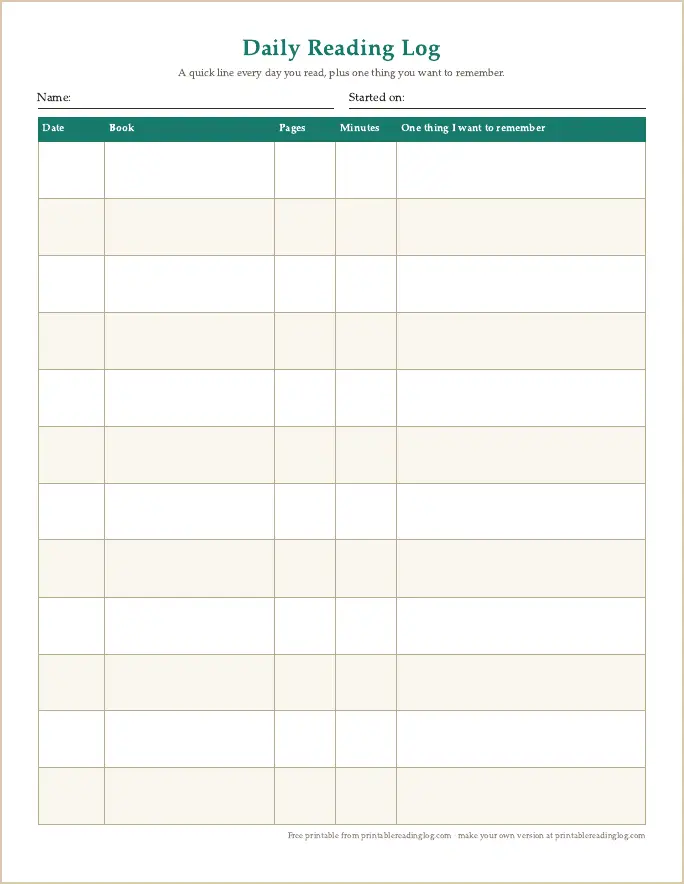
Taller rows with room for a one-line note: date, book, pages, minutes and what happened in the reading.
Why a title-and-author log falls apart by week three of a seminar
Most reading logs were designed for people reading whole books from cover to cover. You write a title, an author, the date you started and the date you finished, maybe a star rating. That works fine for a novel on the weekend.
Graduate reading doesn't look like that. A typical week might include:
- Three or four journal articles of very different lengths
- Two chapters from a monograph you'll never read in full
- A chapter from an edited volume, written by a different author than the editor
- A methods paper your advisor sent "just in case"
- A few dense pages of primary sources or data documentation
- Background reading for a paper you're writing, half of which you only skim
If you log by book, almost none of that fits. The edited volume chapter has two names attached to it. The monograph never gets a "date finished." The articles don't have a book title at all. After a few weeks, the log either gets abandoned or turns into a guilt list of things marked "in progress."
There's a second problem: time. Graduate reading is slow, and the slowness varies a lot. Twenty pages of theory can take longer than sixty pages of a historical narrative. If your log only counts books, you can't see where your hours actually go, so you can't plan your week honestly.
A grad school reading log fixes both problems by shrinking the unit. Each row is one reading assignment or one source. Each row records pages and minutes. Each row ends with one sentence you'll be glad to have when you sit down to write.
One row per article or chapter, eight possible columns
This row setup holds up across most programs. You don't need every column every week, but this is the full set to choose from.
| Column | What to write | Why it matters |
|---|---|---|
| Date | The day you read it | Shows your actual weekly rhythm |
| Title | Short title of the article or chapter | Lets you find the source again fast |
| Author | Last name(s), plus year if you like | Matches how you'll cite it |
| Pages | Page range or page count, e.g. 112-140 or 28 pp | Feeds your weekly page total |
| Minutes | Time spent reading this source | Feeds your pages-per-hour pace |
| Course / project | Course code, "thesis," "comps," "TA" | Sorts readings by where they're needed |
| Takeaway | One line in your own words | Your future self's shortcut |
| Status | Read, targeted, skimmed or partial | Keeps you honest about depth |
A few notes on making these work in practice.
Title. Keep it short. For an article, the first few words of the title are enough. For a chapter in an edited volume, write the chapter title, then the book in brackets if there's room. You'll have the full citation in your reference manager, so the log only needs enough to jog your memory.
Author. Use last names only. If you're in a field that cites author-date, add the year: "Lopez 2019." That way the log already speaks the same language as your papers.
Pages. Write the page count, not just the range, because the count is what you'll add up. "pp. 112-140 (29)" takes two seconds and saves you math later.
Minutes. Round to the nearest five. Don't count the time you spent finding the PDF or answering a message in the middle. If you read in two sittings, add them together on the same row.
Takeaway. This is the column that pays off most. One sentence, your words, no quotes. "Argues that X explains Y better than Z, using case data from three cities" is a takeaway. "Interesting" isn't. If you can't write the line, that tells you something too: you may need to go back to the introduction and conclusion.
Status. Grad students rarely read everything closely, and pretending otherwise makes the log useless. Mark "R" for read closely, "T" for targeted (the key sections only), "S" for skimmed, and "P" for partial, with a page number for where you stopped.
Building the landscape sheet
There's no "grad school" preset in the log builder, but the By pages preset gets you most of the way. These are the choices that turn it into a seminar log.
| Setting | Choose this | Notes |
|---|---|---|
| Start with a preset | By pages | Gives you a page-focused starting layout |
| Reader name | Your name, or a course code | Helpful if you keep one sheet per course |
| Reading goal | Your weekly page target, e.g. 250 pages | Use a number you can check against |
| Log style | Adult-clean | Plain lines, no cartoon details |
| What are you logging? | Pages | Keeps the focus on page counts |
| Color theme | Classic | Prints well in black and white |
| Columns | Title, Author, Pages/Minutes, Notes, Date finished, Genre | See below for how to use each one |
| Rating style | Number | Optional: rate usefulness 1 to 5 |
| Paper | Letter or A4 | Whatever your printer uses |
| Orientation | Landscape | Gives the Notes column real width |
| Rows per page | As many as your week needs | Fewer rows means more writing space |
| Month | The current month | Handy for filing pages later |
The columns need a little repurposing for graduate reading. Title and Author do what they say, with the author column holding last names and year. The Pages/Minutes column holds both numbers, written like "28 pp / 75 min," so you get two figures without extra clutter. Notes becomes your takeaway column, which is the reason for landscape: you want room for a full sentence. Date finished records the day you read it. And Genre becomes your course or project column, where you write "SOC 610," "thesis ch. 2," "comps," or "TA week 6." The printed header still says Genre, but nobody else needs to read it.
If you'd like a usefulness score, turn on the rating column and set the rating style to Number. A quick 1 to 5 for "how useful was this for my work" helps a lot later, when you're hunting for the three sources that actually matter for a paper. The rated reading log shows how a rating column reads on paper.
Skip the goal-tracker squares unless you like them. Some people enjoy coloring one square per article, and if that keeps you going, add the 25 or 50 square bar. Most grad students find the page total more useful than a square count.
Once the preview looks right, save a PDF alongside the printout. A blank master in your course folder means a fresh week's sheet is one print away, even on a lab computer where your browser settings aren't saved.
For a closer look at the page-based version of the log and how it handles partial progress, the reading log by pages page walks through the layout in more detail. If you'd rather keep everything in cells, our guide to a reading log in Excel covers formulas for the totals.
Work Out Your Pages Per Hour
Once you've logged a couple of weeks, the Pages and Minutes columns give you something valuable: your own reading pace for different kinds of material. That's the number that lets you plan realistically instead of hoping.
The math is simple. Divide pages by minutes, then multiply by 60.
Pages per hour = (pages ÷ minutes) × 60
So if you read a 24-page article in 90 minutes, that's 24 ÷ 90 = 0.27 pages per minute, times 60, which is about 16 pages per hour. If you read a 40-page history chapter in 80 minutes, that's 30 pages per hour.
The part people skip: don't use one pace for everything. Your pace on dense theory and your pace on a narrative chapter can be very different. Sort your readings into a few types and keep a separate pace for each.
| Reading type | How to estimate | Your pace (fill in) |
|---|---|---|
| Dense theory or philosophy | Average your last 3-5 rows of this type | ___ pages/hour |
| Empirical journal articles | Same | ___ pages/hour |
| Methods or statistics papers | Same | ___ pages/hour |
| Narrative or historical chapters | Same | ___ pages/hour |
| Primary sources or archival material | Same | ___ pages/hour |
| Skimming for a lit review | Same | ___ pages/hour |
We're not giving you "typical" numbers here, on purpose. Pace depends on your field, how familiar you are with the topic, whether English is your first language, how tired you are, and what you need to get out of the reading. A number from someone else's experience won't help you plan your Tuesday. Your own logged rows will.
After about two weeks, you'll usually notice a pattern. Maybe empirical articles go faster than you thought because you've learned to read the abstract, figures and discussion first. Maybe theory takes twice as long as you budgeted. Either way, you now have a real basis for planning.
Using your pace to plan a week
Once you have your paces, planning a week takes about five minutes:
- List every assigned reading for the week with its page count.
- Label each one by type.
- Divide each page count by your pace for that type to get hours.
- Add up the hours.
- Compare that total to the hours you actually have free.
If the total is bigger than your free time, and in grad school it often is, you now know that before Thursday night instead of during it. That's when you decide what to read closely, what to skim, and what to read only for the argument.
A Weekly Triage Routine That Fits Real Workloads
Graduate syllabi are often written as if you had nothing else to do. You have other courses, teaching, research, a job, maybe a family. The log is most useful when you pair it with a short weekly triage, so you decide in advance how deep to go on each reading.
Set aside fifteen minutes at the same time each week. Sunday evening or Monday morning works for many people. Then go through this checklist.
Weekly triage checklist
- Print a fresh sheet and write the week's dates at the top.
- Copy every assigned reading onto the sheet, one per row, with page counts.
- Add any thesis or project readings you want to get to this week.
- Mark each row with a depth level: Close, Targeted or Skim.
- Estimate hours using your pace for each type.
- Cut or downgrade readings until the hours fit your real week.
- Block reading time on your calendar for the Close readings first.
The depth levels make the cutting honest, as long as you're clear about what each one means.
| Depth level | What you read | When to use it |
|---|---|---|
| Close | Everything, with notes in the margins | Readings you'll present, lead discussion on, or cite heavily |
| Targeted | Intro, conclusion, section headings, key figures, plus one or two sections in full | Most seminar readings in a heavy week |
| Skim | Abstract, intro, conclusion, figures | Background reading, optional readings, early lit review sweeps |
Targeted reading isn't cheating. It's a common, practical way to get the argument, the evidence and the contribution of a piece without spending three hours on it. Your log's Status column keeps track of which readings you went deep on and which you only touched, so you know where to go back later if a source turns out to matter.
A useful rule: if a reading is on your list for discussion and you've only skimmed it, write at least one question in the takeaway column. Walking into seminar with one good question about a skimmed reading beats walking in with nothing.
A sample week, filled in
This is what a week might look like for a second-year student taking two seminars and doing early thesis reading. The names and pages are made up, but the pattern is realistic.
| Date | Title | Author | Pages / Min | Course | Takeaway | Status |
|---|---|---|---|---|---|---|
| Mon | Networks and trust | Rivera 2018 | 26 pp / 80 min | SOC 610 | Trust spreads through weak ties only when a shared institution sits in the background | R |
| Mon | Measuring ties | Okafor 2020 | 18 pp / 70 min | SOC 610 | Proposes a survey item for tie strength; validation sample is small | T |
| Tue | Ch. 3: The city as archive | Haddad 2015 | 34 pp / 65 min | HIST 702 | Treats street names as evidence of who held power in each decade | R |
| Wed | Ch. 4: Paper trails | Haddad 2015 | 29 pp / 55 min | HIST 702 | Same method applied to court records; weaker sourcing than ch. 3 | T |
| Thu | Neighborhood change review | Chen and Park 2021 | 41 pp / 60 min | Thesis | Good map of the field; points to three studies I need for my lit review | S |
| Fri | Missing data basics | Novak 2017 | 22 pp / 95 min | Thesis | Explains when dropping cases biases results; use for methods section | R |
Week total: 170 pages, about 7 hours.
Look at what this tells the student. The methods paper took the longest per page, by a lot. The review article went fastest because it was a skim. The second Haddad chapter went faster than the first, probably because the method was already familiar. Next week, the student knows to budget extra time for anything technical and to start with the readings that build on each other.
The takeaway column is doing double work, too. The Chen and Park row is basically a reminder to go find three more sources. The Novak row already says where it'll be used. When thesis writing starts, those lines are a ready-made trail.
Coursework, comps, thesis and TA weeks each need a different sheet
Your reading changes a lot between the first semester and the last. These four setups match the columns and habits to each stage.
Coursework
Goal: Keep up with seminar readings and walk into class with something to say.
- One sheet per week, all courses together, with the Genre column holding the course code
- Columns: Date finished, Title, Author, Pages/Minutes, Genre, Notes
- In the Notes column, write the takeaway plus one discussion question if there's room
- Total pages and minutes at the bottom of each sheet
Mixing all courses on one sheet shows you the real weekly load, and seeing that load is why you're logging at all. A weekly log layout suits this stage well. If one seminar always eats more than half your hours, that's worth knowing early.
Comprehensive exams
Goal: Work through a long reading list and be able to recall each source months later.
- One sheet per topic area on your list, not per week
- Columns: Title, Author, Pages/Minutes, Notes, Date finished, plus the rating column set to Number
- Use the rating as "how central is this to the field," 1 to 5
- Add the goal-tracker bar if your list has a fixed count, for example 50 or 100 squares for a list of that size
For comps, the takeaway column needs a little more. Try this formula for each row: main claim + evidence + where it fits. For example: "Says schools reproduce class through tracking; uses ten-year cohort data; core reading for the inequality debate." That's a sentence you can study from.
Because comps reading stretches over months, it's easy to forget what you read early on. Every couple of weeks, cover the Notes column and try to recall the takeaway from just the title and author. Anything you can't recall gets a mark for a second look.
Thesis or dissertation research
Goal: Track sources for your own project and know where each one will be used.
- One running log, not weekly sheets, kept in a binder or folder
- Columns: Title, Author, Pages/Minutes, Genre, Notes, Recommend? (Y/N)
- Genre becomes the chapter or section where you expect to use it: "Ch. 2," "methods," "intro"
- Recommend? becomes "Cite? Y/N"
Repurposing the Recommend column pays off quickly. As you read, you decide right away whether a source is going into your writing. At the end of a month, scan the Y rows and you've got a working bibliography for that chapter.
A thesis log also benefits from the read-next list at the bottom of the sheet. Switch it on and treat it as a queue of sources you've found in reference lists but haven't opened yet. It keeps your reading list on paper instead of in forty browser tabs.
Teaching assistant prep
Goal: Read the undergrad assignments, prep discussion, and keep notes for grading.
- One sheet per week of the course you're assisting
- Columns: Date finished, Title, Author, Pages/Minutes, Notes
- In Notes, write the one point you want students to leave with
TA reading is easy to underestimate. It adds hours every week, and if you don't log it, it looks like your own research is moving slowly for no reason. Putting it on paper shows exactly where the time went, which can help when you talk with your advisor about workload.
How to Write Takeaways That Help You Write Later
The takeaway column is where a grad school reading log earns its keep. A good takeaway is a seed for a sentence in your next paper. A bad one is a word you won't understand in three months.
Four takeaway patterns cover most readings across fields. Pick the one that fits.
| Pattern | Formula | Example |
|---|---|---|
| Argument | Argues X because of Y | Argues rent control slows turnover because tenants stay put to keep the rate |
| Method | Uses X to study Y | Uses diary entries to study how workers described shift changes |
| Contribution | Adds X to the debate on Y | Adds rural cases to a debate built mostly on city data |
| Use | Useful for my X because Y | Useful for my methods chapter because it defends small samples |
A few rules keep takeaways sharp:
- Your words, not the author's. If you copy a phrase, you're tempted to quote it later without checking. Paraphrasing while you read helps you understand the piece, and it lowers the risk of accidental copying in your own writing.
- One sentence. If you need more, you're writing a summary. Save that for a separate notes page or a reading log with summary layout that has a bigger box for it.
- Include a reaction when you have one. "Weak sample" or "contradicts Rivera" is often the most useful part of the line later.
- Note the page for anything quotable. If a sentence is so good you know you'll quote it, write "quote p. 47" at the end of the takeaway. You'll thank yourself.
If you're reading for a lit review, add one more habit: after every five sources on the same topic, write one line at the bottom of the sheet that connects them. "Most of these use city data; almost nobody looks at rural areas." Lines like that are often where a research gap shows up.
Week six, and the log has gone quiet
Even a good setup slips in week six of a semester. These are the problems grad students run into most, with what tends to help.
| Problem | Likely cause | Fix |
|---|---|---|
| You stopped filling it in | Logging feels like extra work at the end of a tired day | Log right when you close the PDF, before you do anything else; it takes under a minute per row |
| Every row says "partial" | You're starting too many readings at once | Finish or downgrade to Skim before starting the next one; cap open readings at two |
| Takeaways are vague | You're writing them hours later | Write the line before you stand up from the reading |
| Minutes look wildly off | Breaks and phone time are sneaking in | Use a simple timer and pause it when you stop |
| Page totals feel discouraging | Dense weeks look "small" on paper | Look at minutes too; a 90-page week of theory can be your hardest week |
| You can't find old takeaways | Sheets are loose and out of order | Keep a binder with tabs by course or by thesis chapter |
| The sheet is too cramped | Too many columns in portrait | Switch to landscape and drop the columns you never use |
Two of these deserve a little more attention.
Discouraging totals. Grad school reading is not a race, and page counts can feel unfair when some pages take five minutes each. That's why the log tracks minutes alongside pages. If you only looked at pages, a week spent working through one hard theoretical text would look like a failure. With minutes on the same row, it looks like what it was: a week of serious work.
Too many open readings. It's common to have half a dozen PDFs open, each read to page nine. The log makes that visible, which is uncomfortable but useful. Try a simple rule: no more than two readings marked "P" at once. Before starting a third, either finish one or decide it's a Skim and close it out with a takeaway.
Paper Log, Spreadsheet or Reference Manager?
You probably already use a reference manager for citations, and you might wonder why you'd also want a printed log. They do different jobs.
| Tool | Best at | Weak at |
|---|---|---|
| Reference manager | Storing full citations, PDFs and highlights | Showing your week at a glance or your time spent |
| Spreadsheet | Sorting, totals and long-term pace numbers | Being in front of you while you read |
| Printed reading log | Planning the week, logging as you go, quick review before class | Searching across years of reading |
Many grad students end up using a mix: citations live in the reference manager, the weekly plan and takeaways live on paper, and once a month the totals get copied into a spreadsheet for the long view. The printed sheet is the part you'll actually look at every day, which is why it's worth making it fit your reading.
There's also a simple focus argument for paper. When your log is a printed sheet next to your laptop, you don't have to switch windows or open an app to record a reading, so it's less likely to pull you into email. If you're curious how logs and journals differ in purpose, the comparison of a reading log vs reading journal explains where each one fits, and our comparison of paper and digital logs goes further into the trade-offs. If you want a general adult layout for your non-academic reading on the side, the reading log for adults is a good companion sheet.
Tips for keeping it going all semester
The log only helps if it's still in use by finals. Print ten or twelve blank sheets at the start of the term, because the week you need a fresh one and there isn't one is the week you stop logging. Keep the current sheet physically next to where you read; a clipboard on the desk beats a folder in your bag. On Friday, total the sheet: pages, minutes and number of readings. It takes two minutes and gives the week an ending.
Bring the sheet to advisor meetings, since a page of real takeaways shows progress and gives you something concrete to ask about. Five minutes with the week's takeaways before seminar is often enough to bring every reading back to mind. And if you miss a week of logging, start fresh on Monday rather than reconstructing it. For general ideas on protecting reading time when the semester is crowded, see our notes on fitting more reading into a year.
Part-time students and readers working in a second language
If you hold a job alongside your program, your reading probably happens in brief, scattered blocks: forty minutes before work, a lunch break, an hour after the kids are asleep. The log handles this well if you let one reading take several rows. Write the date and the page range for each sitting, and leave the takeaway blank until the final row for that source. At the end of the week, add the minutes for that title across its rows. You will often find that a reading you thought took "forever" took about the same total time as it would have in one block; it only felt longer because it was spread out.
Part-time students also benefit from planning by the hours they truly have rather than the hours a full-time cohort assumes. If your triage shows six free reading hours and the syllabus needs ten, the depth levels are how you decide, not a sign that you are falling behind.
If you read academic English as a second or third language, keep a separate pace for each reading type just as above, and expect those numbers to rise over the semester as the vocabulary of your field becomes familiar. Some students add a short list of new terms at the bottom of each weekly sheet. Rereading that list on Friday takes a few minutes and makes the next week's readings noticeably smoother. Your logged minutes also give you something concrete to discuss with your advisor or a campus writing center if the reading load feels heavier than it should.
What grad students ask about logging articles
Which columns matter most on a grad school reading log?
The essentials are the date, the title of the article or chapter, the author, the page count, the minutes spent and a one-line takeaway. A course or project column and a status mark for read, skimmed or partial make it much more useful for planning. You can add a usefulness rating if you want to sort sources later.
Should I log by article or by book?
By article or chapter. Graduate reading rarely means finishing whole books, and logging by book leaves most of your work invisible. One row per reading assignment gives you accurate page and time totals.
How do I calculate pages per hour?
Divide the pages by the minutes, then multiply by 60. A 30-page article that took 90 minutes works out to 20 pages per hour. Keep a separate pace for each type of reading, since dense theory and narrative chapters usually move at very different speeds.
Is skimming okay to log?
Yes, and you should log it. Mark it as skimmed in the status column so you know you didn't read it closely. Skimming is a normal part of graduate work, especially for background reading and early lit review searches.
Which preset gets closest to a seminar log?
By pages, switched to the adult style and landscape orientation, with Title, Author, Pages/Minutes, Notes, Date finished and Genre turned on. The Genre column then holds your course code or thesis chapter, and the wide Notes column holds the takeaway.
How long should a takeaway be?
One sentence in your own words. It should say what the reading argues or does, and ideally where you might use it. If you need more space, keep a separate summary page and use the log as an index to it.
How do I keep up when the reading is too much?
Do a short weekly triage. List every reading with its page count, estimate the hours using your own pace, and mark each one Close, Targeted or Skim until the total fits your real week. Read the Close items first.
Does this work for comprehensive exam prep?
It works well. Keep one sheet per topic area on your list, use a richer takeaway that covers the main claim, the evidence and where it fits, and test yourself every couple of weeks by covering the notes column and recalling each source from its title.